What An Alliance Is
The Basics
An alliance is an up-to-100-player group that shares territory, helps members build and heal faster, and fights together in events. Every account can belong to exactly one alliance at a time, and there's a 24-hour cooldown after leaving one before you can join another. Alliances are founded by spending diamonds (or a free creation token), and whoever creates it becomes its R5 — the leader, who sets the alliance's 3-character tag, name, recruitment policy (open, by-request, or closed), and language preference.
Joining, Leaving & Switching Alliances
How to Join
Tap the Alliance icon (bottom-right of your main/HQ screen), then search or browse the alliance list. Tap an alliance's name, then tap Join. What happens next depends on that alliance's recruitment policy: if it's set to Open, you're in immediately; if it's By Request, your application goes to leadership for approval.
How to Leave
Alliance → Settings → Leave Alliance. Read the confirmation pop-up carefully before confirming — leaving can cost you eligibility for an event you'd already signed up for, even if you rejoin before it starts.
Switching Mid-Event: A Real Trap
If you switch alliances during VS (Alliance Duel), your personal points keep counting toward your own individual reward chests, but stop contributing to your old alliance immediately. For your new alliance, you can't start earning points for them until the day after you join — not instantly. Combined with the 24-hour cooldown after leaving an alliance (see above), alliance-hopping around VS timing rarely works out the way players hope.
Ranks, Permissions & Responsibilities
R5 — Leader
One per alliance, with full control: sets alliance direction, manages external diplomacy with other alliances, appoints and demotes R4s, assigns the officer titles that unlock Alliance Skills, and is the only rank that can disband the alliance entirely. In Season 6, the R5 also personally activates two specific Alliance Skills, separate from the ones assigned to R4 officer titles. Because the R5's own activity sets the tone for the whole alliance, a consistently active R5 is widely considered one of the biggest single factors in alliance morale — an R5 who logs in rarely is one of the fastest ways to damage it.
R4 — Officer
The operational layer beneath the R5. R4s can accept and kick members ranked R3 and below, build and manage territory (turrets, flags), start and organize rallies, and activate whichever Alliance Skill is tied to their assigned officer title. What R4s cannot do: kick, promote, or demote another R4, or disband the alliance — only the R5 has that authority. The number of R4 slots is commonly cited as up to 8 by default, expandable to 10 once the Alliance Gifts building reaches level 10, though some older guides cite a lower cap of 6 — worth checking your own alliance's current limit in-game rather than assuming either figure.
Officer Titles & Alliance Skills
The R5 assigns named officer titles (Warlord is one commonly cited example, alongside others such as Recruiter, Muse, and Butler) to specific R4s. Each title does two things at once: it grants a passive combat bonus during events like Alliance Exercise, and — as of Season 6 — it's also the specific key that unlocks that R4 to activate one particular Alliance Skill. This makes title assignment a genuine combat decision, not just an administrative one: a skill tied to a currently-offline officer simply can't be used when the alliance needs it most. The general rule is to match titles to whoever is reliably online during your alliance's actual war windows, not to whoever has been around longest.
R1, R2, R3 — No Enforced Permissions
Unlike some similar games where R3 can promote or demote R2, Last War: Survival gives R1 through R3 no special in-game permissions at all — only R4s and the R5 can promote, demote, or kick anyone. These three ranks exist purely as organizational labels that each alliance defines for itself, commonly tied to things like VS Day performance, tenure, or trust level, rather than anything the game enforces.
If the R5 Goes Inactive
Leadership reportedly transfers automatically to an R4 after an extended period of R5 inactivity (commonly cited around 7 days, though the exact timing isn't reliably documented), passing to an R3 if no R4 exists. Given how long and imprecise that window is, it's not something to rely on as planned succession — if an R5 knows they'll be away for more than a day or two, manually transferring leadership to a trusted R4 in advance, then transferring back on return, is the safer approach.
What Leadership Can Actually See
Confirmed In-Game Visibility
- Yes — the full member list, along with each member's current rank.
- Yes — whether a member is currently online, or roughly how long ago they were last online.
- Yes — Alliance Tech donation rankings, showing who's contributing to the currently-recommended research and how much.
- Yes — VS (Alliance Duel) individual and alliance-wide scores, visible through the event's own in-game leaderboard.
- Yes — rally participation logs, which is exactly why rules like "no solo attacks during a Kill Event without officer coordination" are enforceable — breaking them leaves a visible trace.
Territory
Flags, Turrets & the Fortress
The alliance flag is the cornerstone of territory control — planting one claims an area and lets every member teleport there for free, giving the alliance a shared map presence. R4s and above can plant additional flags to extend that territory further. Alliance turrets are defensive structures placed inside claimed territory that automatically attack any enemy march crossing the border, with their HP and damage scaling based on alliance tech investment. The Alliance Fortress is the late-game centerpiece: a large structure that buffs every member within its radius, and capturing an enemy alliance's fortress (or defending your own) is typically the highest-stakes regular alliance content available.
Alliance Tech
A Separate, Shared Research Tree
Alliance Tech is funded by member donations (using alliance coin, earned through play) rather than personal resources, and its bonuses apply to every member at once. Broad categories include territory and building unlocks, construction/research speed buffs (highest priority early in an alliance's life, since the benefit compounds daily), and troop attack/defense/HP bonuses (the top priority once an alliance is seriously competing in PvP). Alliance leadership typically sets a single recommended tech target at a time and asks members to donate toward it rather than whatever they personally prefer — donating to the recommended tech usually earns a contribution bonus over donating elsewhere.
Alliance Skills
Officer-Title-Linked Abilities
A newer system (introduced in Season 6) ties powerful Alliance Skills to specific officer titles that the R5 assigns to R4 members — only the R4 currently holding a given title can activate its skill, and the R5 personally holds a couple of skills as well. Because of this, assigning titles is a combat decision as much as an administrative one: a skill tied to an offline officer simply can't be used when it's needed. Activating a skill earns the activating player War Merit, scaled by how much impact the skill had.
Marshal's Guard (Alliance Exercise)
Marshal's Guard: The Basics
Marshal's Guard (officially called Alliance Exercise) is a recurring alliance event running roughly every 2–3 days. It has four stages: Selection (an R4 or R5 sets the difficulty and battle time), Preparation (members donate to boost the alliance's damage bonus), Battle (a 30-minute window, manually started by an R4 or R5), and Rewards. The goal during Battle is to destroy 5 armored tanks as a group before time runs out.
The rule that catches people out: only 3-minute rallies count toward damage. Solo attacks and 1-minute rallies do nothing, per the game's own official rules.
Joining a rally led by an R5 gives a +5% damage bonus, an R4-led rally gives +2.5%, and Drill Field donations made during the Preparation stage add up to +25% on top of that.
Squad tactic: use your strongest squad to join rallies rather than lead them, and a second, weaker squad to start rallies for others to join instead — joining consistently deals more damage per squad than leading. See Alliance Strategy for the full breakdown.
Before it starts: turn on "Offline Participation" under Alliance → Alliance Events, so your strongest lineup still auto-joins a rally if you have to step away mid-event.
Marshal's Guard: Rewards & the MVP Bonus
Marshal's Guard rewards come in two forms: Individual rewards, scaled to your own personal damage dealt, and Alliance-wide rewards, scaled to the alliance's total damage and the difficulty chosen. Whoever deals the single highest amount of personal damage becomes the event's MVP, which multiplies the entire alliance's rewards by anywhere from 1× to 10× depending on how much damage that MVP dealt — worth alliances coordinating support behind their strongest damage-dealer specifically for this reason.
Since MVP is judged on your own personal damage, the same squad tactic applies: joining rallies with your strongest squad rather than leading them is usually the best way to maximize your own damage total.
Offline Participation
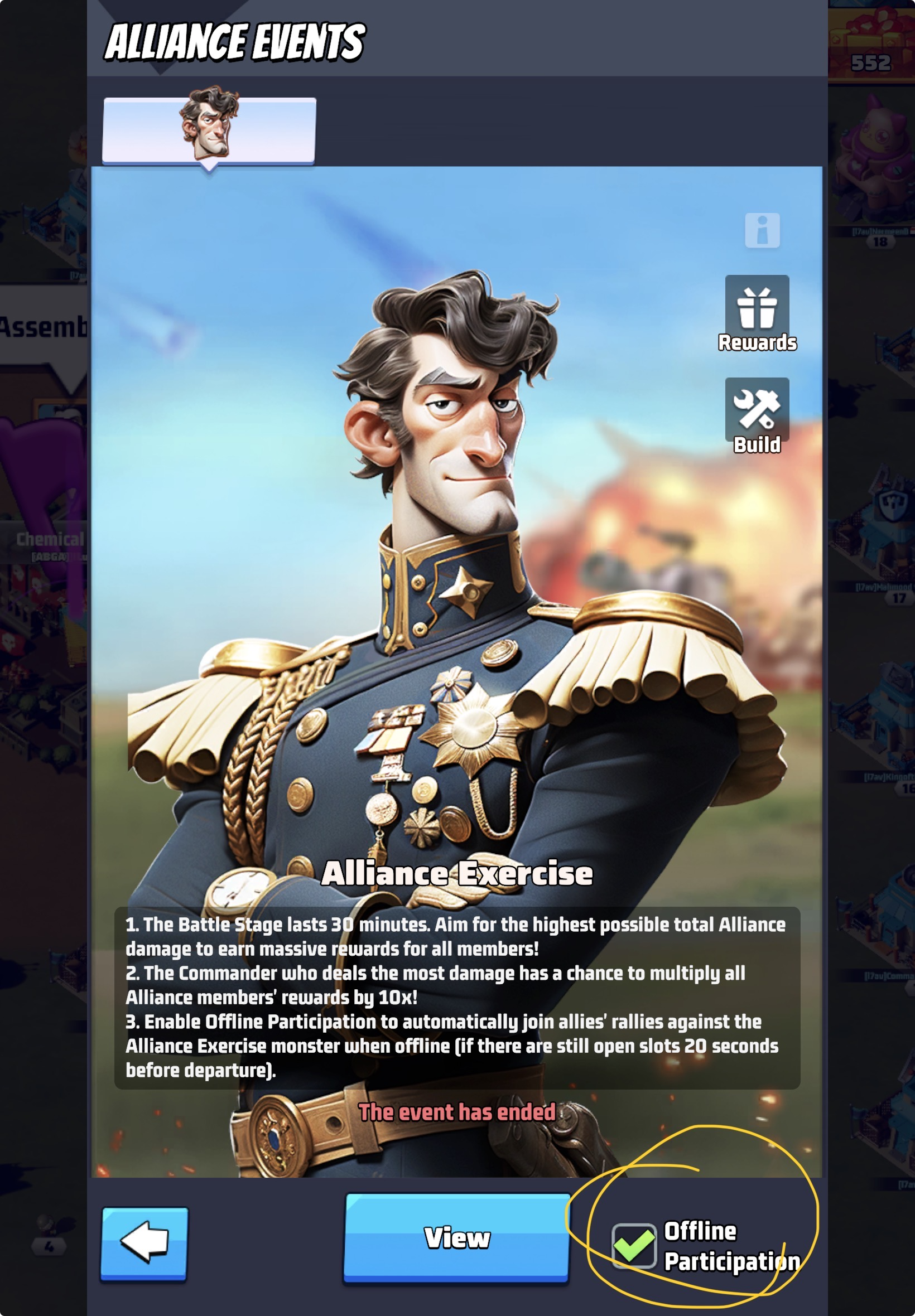
If the Marshal's Guard event happens while you are likely to be out, or asleep, then activate the offline participation option by: select Alliance from the home screen, select Alliance Events from the list, then click the "Offline Participation" option in the lower right hand corner.
Benefits of Membership vs. Playing Solo
The Core Trade-Off
A solo player earns resources alone, spends them alone, and recovers from every setback entirely alone — there's no shared cushion when something goes wrong. An alliance turns that into a shared cycle: contribution, return, reinforcement. Early-game solo play often feels perfectly fine, since timers are short and mistakes are cheap to recover from — the gap becomes obvious later, once upgrade timers stretch into days, multiple events start overlapping, and a single bad call costs meaningfully more to recover from without help.
| Alliance Membership | Solo Play |
|---|---|
| Build/research help from other members can shave real time off every timer — a full, active alliance can provide dozens of instant helps. | Every timer runs its full length with no outside help. |
| Alliance Tech grants permanent, account-wide combat and production bonuses to every member. | No access to Alliance Tech bonuses at all — a meaningful, compounding combat power gap versus similarly-invested alliance players. |
| Reinforcements let allies garrison your base for defense, and rallies let the group take down targets no individual could beat alone. | No reinforcements and no rally access — you can only fight at the scale your own account allows. |
| Access to the Alliance Store (shields, speedups, teleporters, drone parts) via contribution points. | No access to the Alliance Store at all. |
| Several major events (Alliance Duel VS, Desert Storm Battlefield, Capitol/Fortress wars) are only available through membership. | Locked out of alliance-exclusive events entirely. |
| Group participation spreads the resource cost of milestone-based events across many members. | Milestone-based events often demand disproportionate personal spending just to keep pace, for a smaller relative reward. |
Why Join One At All — The Short Version
- Alliance Help — other members can shave time off your building and research timers.
- Alliance Gifts — free items triggered when members open chests or hit milestones.
- Alliance Store — a shop stocked using contribution points earned from donations and participation; leaving an alliance keeps your accumulated points for use elsewhere, but you lose shop access until you rejoin one.
- Reinforcements & coordinated attacks — defensive backup when you're attacked, and the ability to organize offensives that would be impossible solo.
- Event access — several major events (Alliance Duel VS, Desert Storm Battlefield, Capitol/Fortress wars) are only available through alliance membership.