The Headline Play
Stack VS Day Theme + Arms Race Phase for Multiplied Credit
VS (Alliance Duel) and Arms Race run in parallel, and their themes overlap on purpose. Completing a major action during the VS day theme that matches the currently active Arms Race phase earns double credit for that single action — the same spend counts toward both events at once. Stack a third layer and it compounds further: landing a Tech Center upgrade specifically during VS Research Day (Day 3) while Arms Race is in a Tech Research phase can produce triple credit for one completion. Most accounts never deliberately time this and leave the extra credit on the table entirely — checking both event calendars before committing a big completion is worth the 30 seconds it takes.
Resource Stacking & Timing
Stack Radar Tasks for VS Days, Not Every Day
Radar Task completion only scores VS points on Days 1, 3, and 5 (Monday, Wednesday, Friday) — see VS (Alliance Duel) Day-by-Day Guide. On the days in between (Tuesday and Thursday), complete tasks as normal but don't open/collect them — leave them stacking instead. A counter in the top-left corner of the map screen shows how many completed tasks you're currently holding against your storage cap (commonly 35-44 depending on your Radar building's level). Let that counter climb as close to your cap as you can manage on the off-days, then open everything in one batch right after reset on the next VS day (1, 3, or 5) for the biggest possible points swing. One thing worth watching: if your storage genuinely maxes out, the task refresh timer stops entirely and you lose new tasks until you free up space — so don't push it so close to the cap that you risk overflowing overnight.
Combat & PvP Tricks
Avoid the Direct-March Warning
Sending troops as a direct march from your own base triggers a visible red alert on the target's screen, giving them roughly 50 seconds to simply teleport away before your troops arrive. This is the most avoidable way to blow a surprise attack — approaches that don't originate as an obvious direct march (garrison-based plays, joining an existing rally) don't tip off the target the same way.
The resource-tile redirect: send your march to "Gather" at a resource tile positioned near the target, so your path crosses close by it. Once your troops are near the tile, redirect the march to Attack the base instead. Because the warning only starts counting down once the attack order is actually given, the target gets roughly 7–9 seconds of notice instead of 50 — barely enough time to react. As a side effect, marching via a nearby tile is often faster overall than a long direct march from your own base.
Instant Rally-Join via Garrison
If you're already garrisoned inside a teammate's shielded base and they launch a rally from there, tap the rally icon the moment it appears to join instantly with the squad already stationed inside — no separate march time needed. This fills and launches the rally noticeably faster than everyone marching in individually, giving the target less warning to prepare or flee.
The "Deep Bench" Reinforcement Trick
Send one squad to garrison a contested base, then hide additional squads inside a separate shielded ally's base nearby. If the first squad is defeated defending that base, you can immediately pull a fresh squad from the shielded base and re-garrison — creating a rotating wave of reinforcements rather than a single squad that, once beaten, leaves the position empty.
Hide Troops When You're Losing
If your own base is under serious threat, garrison your extra squads inside shielded allies' bases before the hit lands. Even if your home base gets fully cleared out, those hidden squads survive intact and are ready to redeploy the moment you need them — don't let a losing defense cost you troops that didn't need to be there.
War Fever: A Free 1% Damage Boost, Timed Right
Sending a scout plane to an enemy base, or starting an attack/rally against one (not zombies), triggers "War Fever" — a temporary 1% damage boost lasting 15 minutes. You can cancel the attack or scout immediately after it activates and still keep the buff, and repeating the trigger action refreshes the timer. The catch: triggering it removes your shield, and you can't shield while it's active. Time it for moments your shield isn't up anyway — while you're actively online and defending, for instance — and it's a damage boost with no real downside.
Shields Aren't Cumulative — Time Them Deliberately
Starting a new shield doesn't add to time remaining on an existing one — it replaces it. If you start an 8-hour shield 3 hours before a 12-hour shield would have expired, you're shielded for the next 8 hours only, not the combined total. Always shield up before your current one runs out, and specifically before server reset if you plan to be offline, asleep, or traveling.
What actually turns your shield off: soloing an attack on another player, opening a rally against a player, attacking an occupied resource tile, or scouting. What keeps it on: joining a rally against a player, soloing or rallying zombies, teleporting, and garrisoning bases. There's also a 15-minute cooldown before a dropped shield can be reactivated — factor that in before you deliberately break one mid-session.
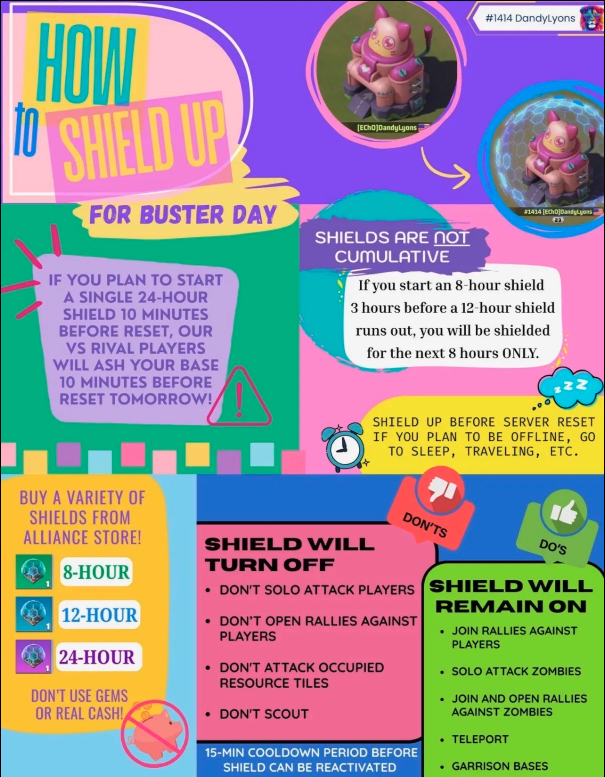
Guide credit: DandyLyons.
Rally Speed-Up With Gems
Once a rally is already marching, a fast-forward icon appears that lets you spend gems (commonly cited around 1,000) to significantly cut the remaining march time. Worth keeping in mind for time-sensitive coordination — arriving even a little earlier than planned can matter in a contested fight.
Spending & Research Sequencing
The Second Tech Center
Unlocking a second Tech Center queue (via clearing District 102, roughly a $10-equivalent purchase) is consistently described by veteran players as one of the single most impactful early purchases available — the return starts the moment it goes live and compounds across every subsequent season, since you're now researching two trees in parallel instead of one.
Split Your Research Queues by Purpose
A commonly recommended split once you have two Tech Center queues: run Development and Economy continuously in one queue, since they're badge-free and their benefits compound the earliest. Reserve the second queue for the Alliance Duel tech branch and Special Forces, timed specifically around VS event windows when Valor Badge rewards are at their highest — see VS (Alliance Duel) Day-by-Day Guide for exactly when that is.
The Bottleneck Is Rarely Resources
At a structural level, players who feel "stuck" almost always assume it's a resource shortage — but the actual cause is usually an unplanned prerequisite building sitting unaddressed in the queue ahead of the real target. See Prerequisites & Unlock Requirements for the two-level preview habit that prevents this specific trap.